CSS Inspector Extension
Quickly inspect and copy CSS from any element on any webpage
View the Project on GitHub dangtrannam/css-inspector-extension
CSS Inspector - Chrome Extension
Quickly inspect and copy CSS from any element on any webpage.
Demo
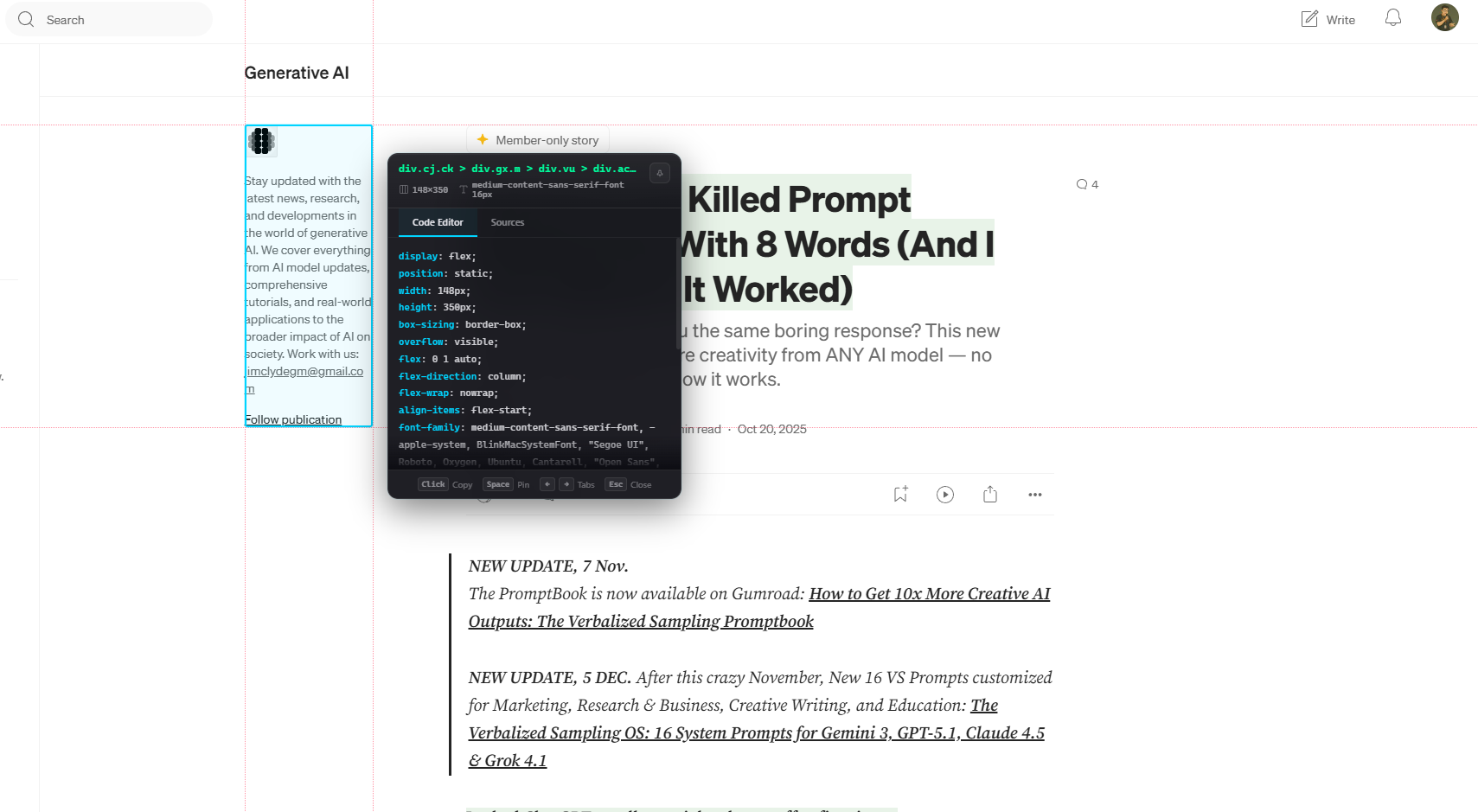
https://github.com/user-attachments/assets/screenshots/recording-1.mp4
Features
- Point-and-click inspection: Hover to highlight elements, click to select and display CSS.
- Advanced CSS extraction: Get computed styles and source rules from stylesheets.
- Premium Glassmorphism UI: Interactive, cursor-following overlay panel with a sleek, modern design.
- Interactive Panel: Pin/unpin the panel, switch between ‘Code Editor’ and ‘Sources’ views, and navigate tabs with arrow keys.
- One-click copy: Copy CSS rules, selectors, or source styles with a single click.
- Keyboard shortcuts:
Escapeto close,Spaceto pin/unpin the panel,Arrow keysto switch tabs. - Ruler guides: Visual crosshair rulers for accurate element measurement.
- Instant Feedback: Toast notifications for copy actions and other interactions.
- Accessibility: Supports
focus-visibleandprefers-reduced-motionfor enhanced usability. - Dark Theme: VS Code-inspired dark theme for a consistent developer experience.
Installation
From Source (Development)
- Clone/download this repository
- Open Chrome and go to
chrome://extensions/ - Enable Developer mode (top right toggle)
- Click Load unpacked
- Select the
css-inspector-extensionfolder
Usage
- Click the extension icon in Chrome toolbar
- Click Start Inspecting
- Hover over any element to highlight it
- Click to select and extract CSS
- Copy selector or full CSS styles
Project Structure
css-inspector-extension/
├── manifest.json           # Extension configuration (MV3)
├── background.js           # Minimal service worker for extension lifecycle
├── popup.html              # Popup UI structure
├── popup.css               # Popup styling (Glassmorphism theme)
├── popup.js                # Popup logic and communication
├── src/
│   ├── scripts/
│   │   └── content-script.js   # In-page element inspection, CSS extraction, panel rendering
│   ├── styles/
│   │   └── overlay.css         # Styles for overlay, panel, and rulers injected into page
│   └── images/
│       ├── icon.svg            # Source SVG for icons
│       ├── icon-16.png         # Extension icon (16x16)
│       ├── icon-48.png         # Extension icon (48x48)
│       └── icon-128.png        # Extension icon (128x128)
├── docs/                   # Project documentation
├── plans/                  # Implementation plans and reports
├── test-page.html          # Development test page for quick validation
└── README.md               # Project overview and usage guide
Permissions
activeTab: Grants temporary host permission to the active tab when the user explicitly invokes the extension.scripting: Required to inject and manage content scripts dynamically into web pages on-demand.clipboardWrite: Enables the functionality to copy extracted CSS and selectors to the clipboard.
Security Note: The extension uses minimal permissions. Content scripts are only injected when you click “Start Inspecting” on supported pages (excludes chrome://, chrome-extension://, and about: pages).
Browser Support
- Chrome 88+ (Manifest V3 required)
- Edge (Chromium-based)
Development
No build step required. Edit files directly and reload extension.
# Package for Chrome Web Store
zip -r css-inspector.zip . -x "*.git*" -x "docs/*" -x "plans/*" -x "test-page.html" -x ".claude/*" -x "src/images/*.error.txt" -x "*.mp4" -x "*.webm" -x "*.mov" -x "*.avi" -x "*.mkv" -x "_config.yml" -x "repomix-output.xml"
License
MIT